SOUNDDNA CASTING
Cast your listening panel like a director casts a film
What it is. Casting helps organisers of listening sessions — clubs, editorial teams, dealers, groups of friends — assemble a panel based on measured listening profiles, not on who happened to be free or loudest in the group chat.
Paste your list, and let the profiles do the casting.
Every listening session has an invisible bias built into its guest list: friends invite friends, editors invite people who already agree with them, dealers invite regulars who already like what’s on the shelf. The result sounds unanimous — not because the product is right for everyone, but because the room was never diverse to begin with. Casting breaks that pattern. You tell it how many seats you have and what kind of panel you want, and it builds the guest list from measured profiles instead of habit.
It’s built for the moments when the composition of the room matters as much as the product on the table: a launch event that needs to hear from all four elements, a review panel that shouldn’t be four Architects in a row, a voicing session that wants one consistent ear instead of four different ones. Your IDs never leave your browser — only the result links are sent to build the line-up, and nothing is kept afterwards.
A note on how it chooses. The algorithm never sorts by the label you see (Architect, Voyager, Pulse, Companion) — it compares full profiles across all four elements underneath. That’s why a line-up can occasionally look surprising: give it five Voyagers and two Companions and ask for the most convergent trio, and it might return two Voyagers and one Companion — if that particular Companion’s full profile genuinely sits closer to those two Voyagers than the other three Voyagers do. The label is a summary for humans; the panel is built from the measurement.
Paste 3 to 100 result links — the tool selects a panel of 2–19 people from your pool.
HOW TO USE IT — step by step:
1. Add your participants — two ways to do it:
- Paste a list: for a handful of names or fifty, paste them all at once. One line per participant: your own ID, then a semicolon (or a tab, if you’re pasting straight from a spreadsheet), then the result link — exactly what two spreadsheet columns produce. The ID can be anything you already use to track people: a number (“15”), a number with a dot (“15.”), a name (“Kathrin”), or a name plus initial (“Kathrin K.”) — whatever matches your own sign-up list. That’s the exact label you’ll see again in the result.
- Individual fields: for a short list, add participants one by one instead.
2. Choose the panel size: 2 to 19 people.
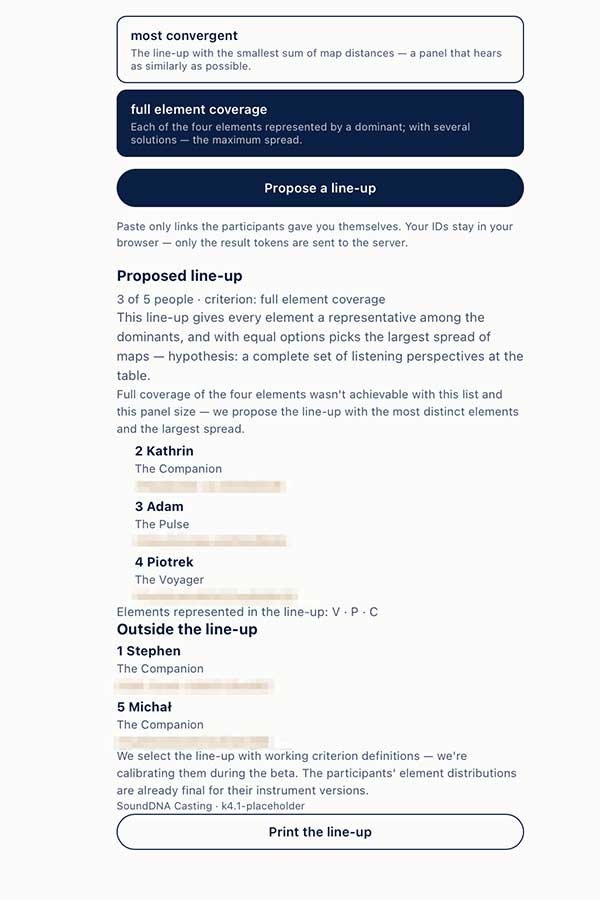
3. Choose the selection rule: most divergent (the widest possible spread of hearing), most convergent (one collective ear), or full element coverage (every element gets its representative).
4. Click “Propose a line-up”.
5. Read the result — the line-up described in your own IDs, so only you know who is who. Need a paper copy for the room? Print it straight from the result.
One list, one panel size, one criterion — that's the whole setup.

The proposed line-up, with every element accounted for — inside the panel and out.